
At the start of the year I moved my tasks from Todoist to Obsidian, using the Tasks plugin. What came out of it is a task list that feeds itself. Here is how it works.
Post
My tasks now live where my notes and projects live. How I write a task down only once and still always see what is due today, this week and in which project.
At the start of the year I moved my tasks from Todoist to Obsidian, using the Tasks plugin. What came out of it is a task list that feeds itself. Here is how it works.
My knowledge, my notes and my projects live in Obsidian. My tasks lived somewhere else. When I worked on a project, the note was in one app and the task in another.
What I specifically missed was linking: between the tasks themselves and the material I need for them, such as project notes and the like. In Obsidian I had had that for a long time. In Todoist, linking was possible, but cumbersome: on one side I had to dig out the URL, on the other side paste something in. In Obsidian I have everything together right away.
There is a second thought that has always bothered me: I depend on a platform that belongs to someone else. I want to be the master of my data and have it stored with me. With Todoist, all my tasks were stored at Todoist.
With the Tasks plugin, every checkbox in Obsidian becomes a task. It is just a normal line in a note. Everything else is added at the end: dates and tags.
- [ ] Send proposal #Projekt/Client/ProjectName ➕ 2025-01-08 ⏳ 2025-01-13The plugin reads the line and knows: the task was created on January 8 (➕), I want to work on it on January 13 (⏳), and it belongs to a project.
If there is a hard deadline, a due date is added (📅). Recurring tasks get a 🔁.
My tasks live in two notes in a folder called Questlog: one for spontaneous tasks, one for recurring ones.
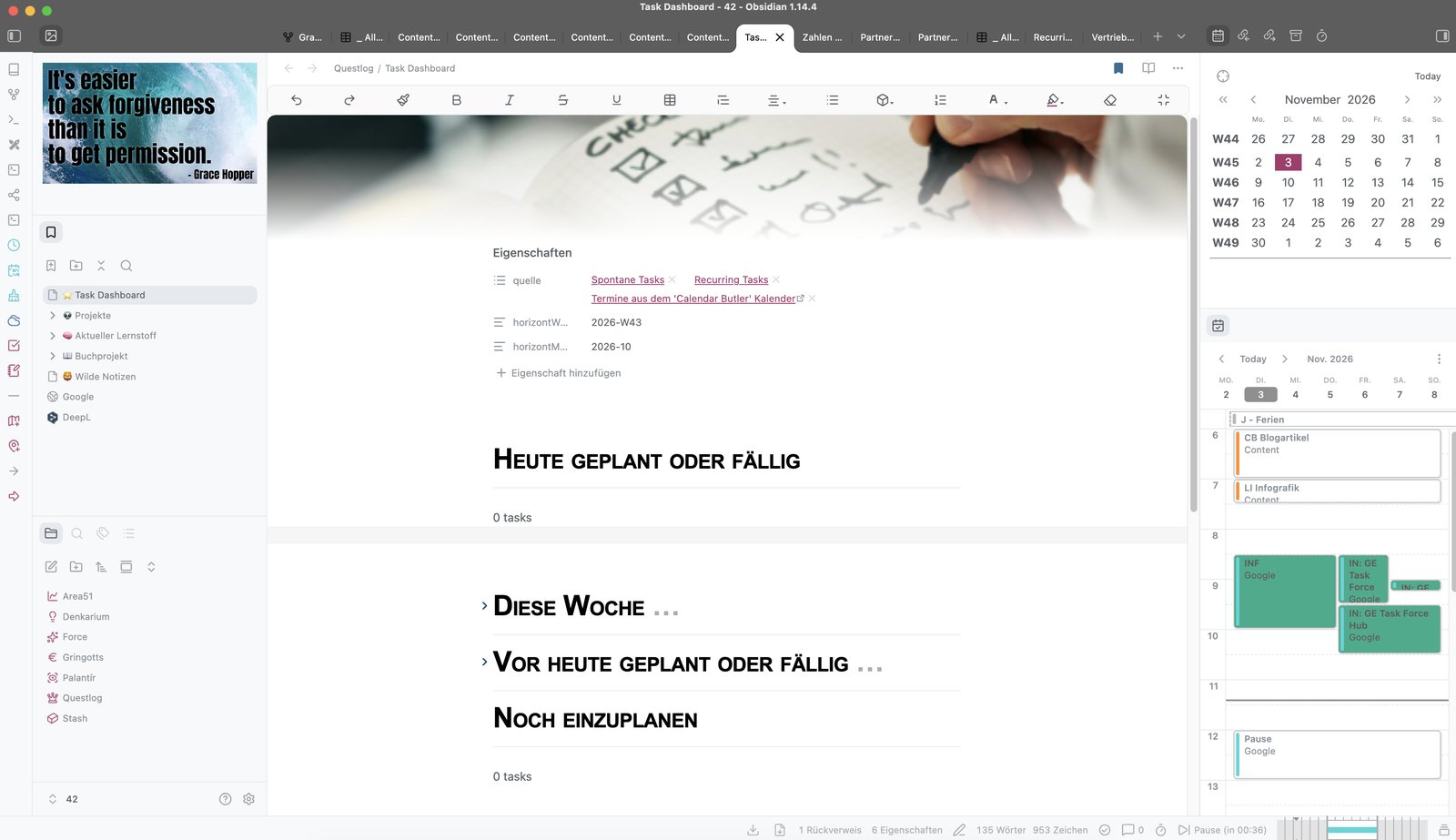
The real work is done by one note, the Task Dashboard. It contains no tasks itself, only queries. Each query searches my two task notes for all open tasks that match it:
A task without a date lands in "Still to schedule". Once it has a date, it moves to "Today" by itself when the day comes. If I did not get it done, it shows up under "Planned or due before today" the next day. I do not have to move or copy anything.
I write a task down once. Its dates and its tags decide where it shows up.
Every project has its own page, the project anchor. It contains a query: all open tasks with that project's tag. So I never put a task "into" a project. I give it the project tag, and it appears on the project page.
There is also an overview that groups all open tasks by project. And a query that shows me running projects that have no open task. A project without an open task has no next step.
Everything that comes back regularly sits in the second note with a repeat pattern, for example every Friday. When I tick the task off, the plugin creates the next round automatically. Every two weeks I also have a task that reminds me to create project pages or routines that are still missing.
The move was not difficult. I kept new tasks in Obsidian and tested whether it worked. No quick fix, but a gentle trial run.
Then came the big bang: in about two hours I exported all my tasks and transferred them. That finished everything, and I had it all set up within those two hours.